The ReFH() function
This quick guide provides an overview of how to generate a design hydrograph using the ReFH method. It is assumed that the reader has knowledge of the theory of the ReFH method; this guide is intended to demonstrate how to use the UKFE package rather than to explain the method.
The ReFH() function is designed for flexibility and each
parameter of the model, along with the inputs and initial conditions,
can be user-defined. By default, when catchment descriptors are
provided, the ReFH function uses these descriptors to estimate the
parameters of the ReFH model, and an estimate of the two-year rainfall
for the critical duration (the two year rainfall is approximated from
the RMED catchment descriptors). When catchment descriptors are applied,
individual parameters and settings can still be adjusted by the user and
these adjustments override the estimates from the catchment descriptors.
Further details can be found in the function’s help file.
This function applies the ReFH model as specified by Kjeldsen (2007). The ReFH model has since been updated to address some of the limitations. The updated version(s), known as ReFH2, was developed by Wallingford Hydro Solutions (2019) and is available for a licence fee. Henceforth, the original model is denoted ReFH1, and the term ‘ReFH’ is used when the comment applies to the original and updated versions.
The ReFH outputs are commonly used only to derive a reasonable hydrograph shape. This shape is then scaled to match the peak flow estimate derived using other methods (usually FEH statistical methods). An example of doing this with the function is provided below. There is no automated way of doing so within the function but ReFH parameters can be calibrated using observed rainfall and data to replicate storm events.
Assumptions and limitations of the ReFH1 model are provided at the bottom after the example of how to derive a design hydrograph.
Derive a design hydrograph using the ReFH method
In the following example, the ReFH() function is used to derive a design hydrograph, i.e., a hydrograph shape scaled to our design flood estimate (assuming the site to be ungauged). The default use of ReFH() with the catchment descriptors provides the rainfall-runoff outputs for an estimate of the two-year design rainfall event:
# Obtain catchment descriptors for NRFA gauge 55002
CDs.55002 <- GetCDs(55002)

# Obtain outputs of the ReFH model from catchment descriptors for a default 2-year
# rainfall event
ReFHResult55002 <- ReFH(CDs.55002)
#> Warning in ReFH(CDs.55002): Water balance was violated with the initial BR
#> setting. To correct this, BR was set as a function of the proportion of
#> net-rain to rain (NetProp) as BR = (1/NetProp)-1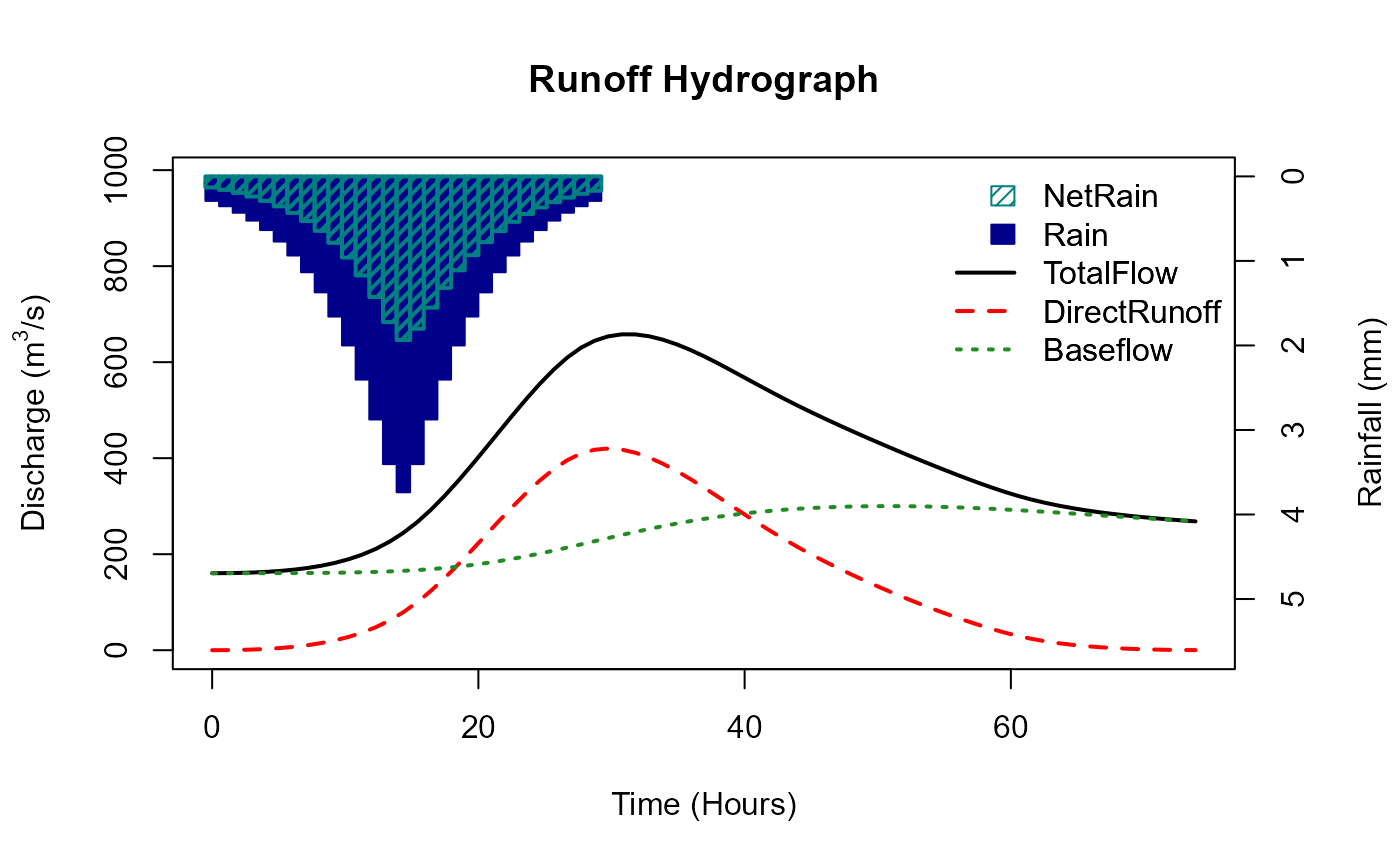
# print to console
ReFHResult55002
#> [[1]]
#>   AREA   TP Duration    BR   BL Cmax Cini BFini Season Depth Timestep
#> 1 1890 12.8     29.8 0.931 62.6  306  138   160 winter  41.3 1.025998
#>   DurationFinal PeakFlow
#> 1          29.8      644
#>
#> [[2]]
#>     Time_hrs  Rain NetRain  Runoff Baseflow TotalFlow
#> 1   0.000000 0.290   0.131   0.000      160       160
#> 2   1.025998 0.353   0.160   0.141      160       161
#> 3   2.051997 0.430   0.195   0.593      160       161
#> 4   3.077995 0.523   0.238   1.420      160       162
#> 5   4.103993 0.635   0.290   2.710      160       163
#> 6   5.129992 0.771   0.354   4.570      161       165
#> 7   6.155990 0.936   0.432   7.110      161       168
#> 8   7.181988 1.130   0.527  10.500      161       171
#> 9   8.207987 1.370   0.644  14.900      161       176
#> 10  9.233985 1.660   0.786  20.600      161       182
#> 11 10.259984 2.000   0.960  27.700      162       189
#> 12 11.285982 2.400   1.170  36.800      162       199
#> 13 12.311980 2.880   1.430  48.100      163       211
#> 14 13.337979 3.400   1.720  62.200      163       226
#> 15 14.363977 3.740   1.940  79.200      164       244
#> 16 15.389975 3.400   1.800  99.500      166       265
#> 17 16.415974 2.880   1.550 123.000      167       291
#> 18 17.441972 2.400   1.320 150.000      169       319
#> 19 18.467970 2.000   1.110 178.000      172       350
#> 20 19.493969 1.660   0.931 208.000      174       382
#> 21 20.519967 1.370   0.777 239.000      178       416
#> 22 21.545965 1.130   0.647 269.000      181       450
#> 23 22.571964 0.936   0.537 299.000      185       484
#> 24 23.597962 0.771   0.445 328.000      189       517
#> 25 24.623960 0.635   0.368 354.000      194       548
#> 26 25.649959 0.523   0.304 377.000      199       576
#> 27 26.675957 0.430   0.250 396.000      204       600
#> 28 27.701956 0.353   0.206 410.000      210       619
#> 29 28.727954 0.290   0.170 418.000      215       633
#> 30 29.753952 0.000   0.000 420.000      221       641
#> 31 30.779951 0.000   0.000 418.000      226       644
#> 32 31.805949 0.000   0.000 411.000      231       642
#> 33 32.831947 0.000   0.000 401.000      236       637
#> 34 33.857946 0.000   0.000 388.000      241       629
#> 35 34.883944 0.000   0.000 373.000      245       619
#> 36 35.909942 0.000   0.000 357.000      249       606
#> 37 36.935941 0.000   0.000 339.000      253       592
#> 38 37.961939 0.000   0.000 320.000      257       577
#> 39 38.987937 0.000   0.000 301.000      260       561
#> 40 40.013936 0.000   0.000 283.000      263       545
#> 41 41.039934 0.000   0.000 264.000      265       529
#> 42 42.065932 0.000   0.000 246.000      267       514
#> 43 43.091931 0.000   0.000 229.000      269       498
#> 44 44.117929 0.000   0.000 213.000      271       484
#> 45 45.143928 0.000   0.000 197.000      272       470
#> 46 46.169926 0.000   0.000 183.000      273       456
#> 47 47.195924 0.000   0.000 169.000      274       443
#> 48 48.221923 0.000   0.000 155.000      275       430
#> 49 49.247921 0.000   0.000 142.000      275       417
#> 50 50.273919 0.000   0.000 130.000      275       405
#> 51 51.299918 0.000   0.000 117.000      275       393
#> 52 52.325916 0.000   0.000 106.000      275       381
#> 53 53.351914 0.000   0.000  94.500      275       369
#> 54 54.377913 0.000   0.000  83.600      274       358
#> 55 55.403911 0.000   0.000  73.200      273       347
#> 56 56.429909 0.000   0.000  63.300      273       336
#> 57 57.455908 0.000   0.000  53.800      272       326
#> 58 58.481906 0.000   0.000  45.000      271       316
#> 59 59.507904 0.000   0.000  36.900      270       306
#> 60 60.533903 0.000   0.000  29.700      268       298
#> 61 61.559901 0.000   0.000  23.700      267       291
#> 62 62.585900 0.000   0.000  18.600      265       284
#> 63 63.611898 0.000   0.000  14.500      264       279
#> 64 64.637896 0.000   0.000  11.100      263       274
#> 65 65.663895 0.000   0.000   8.400      261       269
#> 66 66.689893 0.000   0.000   6.220      260       266
#> 67 67.715891 0.000   0.000   4.490      258       262
#> 68 68.741890 0.000   0.000   3.140      256       260
#> 69 69.767888 0.000   0.000   2.100      255       257
#> 70 70.793886 0.000   0.000   1.320      253       255
#> 71 71.819885 0.000   0.000   0.752      252       253
#> 72 72.845883 0.000   0.000   0.364      250       251
#> 73 73.871881 0.000   0.000   0.122      249       249
The output that is printed to the console is a list with two elements. The first element is a data frame of parameters, settings, initial conditions, the catchment area, and peakflow. The second is a data frame with the following columns: Time, Rain, NetRain, Runoff, Baseflow and TotalFlow. A runoff hydrograph plot is also produced.
Scaled ReFH hydrograph
To scale the hydrograph to the design flow estimate, the results from the ungauged pooling can be used (assuming this is for the ungauged case). We can use the estimate from the FEH statistical analysis vignette:
# Create an ungauged pooling group for site 55002
PoolUG.55002 <- Pool(CDs.55002, exclude = 55002)

# Estimate QMED for site 55002 using catchment descriptors and two donor gauges
CDsQmed.55002 <- QMED(CDs.55002, DonorIDs = c(55007, 55016))

# Estimate design flows using the above pooling group and QMED
Results55002 <- PoolEst(PoolUG.55002, QMED = CDsQmed.55002, CDs = CDs.55002)
The results are in the form of a list. The first element provides the return levels, and the 100-year flow estimate is in the 8th row in the second column. We’ll make it an object and use it to scale the hydrograph:
# Extract the 100-year flow estimate (the [[1]] denotes the first element of the list - which is a dataframe, then [8,2] is the 8th row and 2nd column of that dataframe)
Q100.55002 <- Results55002[[1]][8, 2]

# Obtain the final flow outputs of the ReFH model from catchment descriptors for a default 2-year
# rainfall
TotalFlow <- ReFHResult55002[[2]]$TotalFlow

#Scale this by dividing by the maximum of the flow
ScaledFlow <- TotalFlow / max(TotalFlow)

#Multiply the scaled flow by our peak flow estimate and plot
plot(ScaledFlow * Q100.55002, type = "l", lwd = 2, ylab = "Discharge (m3/s)", xlab = "Time (hours)")
Exporting results
For use outside of ‘R’, these outputs can be saved as objects and then written to CSV files:
# Save the ReFH design hydrograph to an object called 'DesignHydro55002'.
DesignHydro55002 <- ScaledFlow * Q100.55002

# Write to csv
write.csv(DesignHydro55002, "my/file/path/DesHydro55002.csv", row.names = FALSE)
Note in these examples that row.names = FALSE in the
write.csv() function: our data has no row names, so this
prevents an index column being added to the CSV.
ReFH function as a flexible design rainfall funoff tool
By default this ReFH function is the orginal ReFH model as described by Kjeldsen (2007). Also by default the Flood Studies Report (FSR) rainfall profiles are applied. However, it has many options, including the ability to provide rainfall or choose a randomised profile. Furthermore, the main components can be adjusted such as the unit hydrograph shape, the baseflow, and the loss. For example, if you set UHShape = “FSR”, BR = 0, and Loss = 0.5 (or some other proportion), the FSR/FEH design rainfall runoff model is the result. You can also set UrbanLoss = TRUE, and the urban loss model as used in the ReFH2.3 software is applied.
ReFH.FSR <- ReFH(CDs.55002, RainProfile = "Centre", UHShape = "FSR", Loss = 0.3, BR = 0)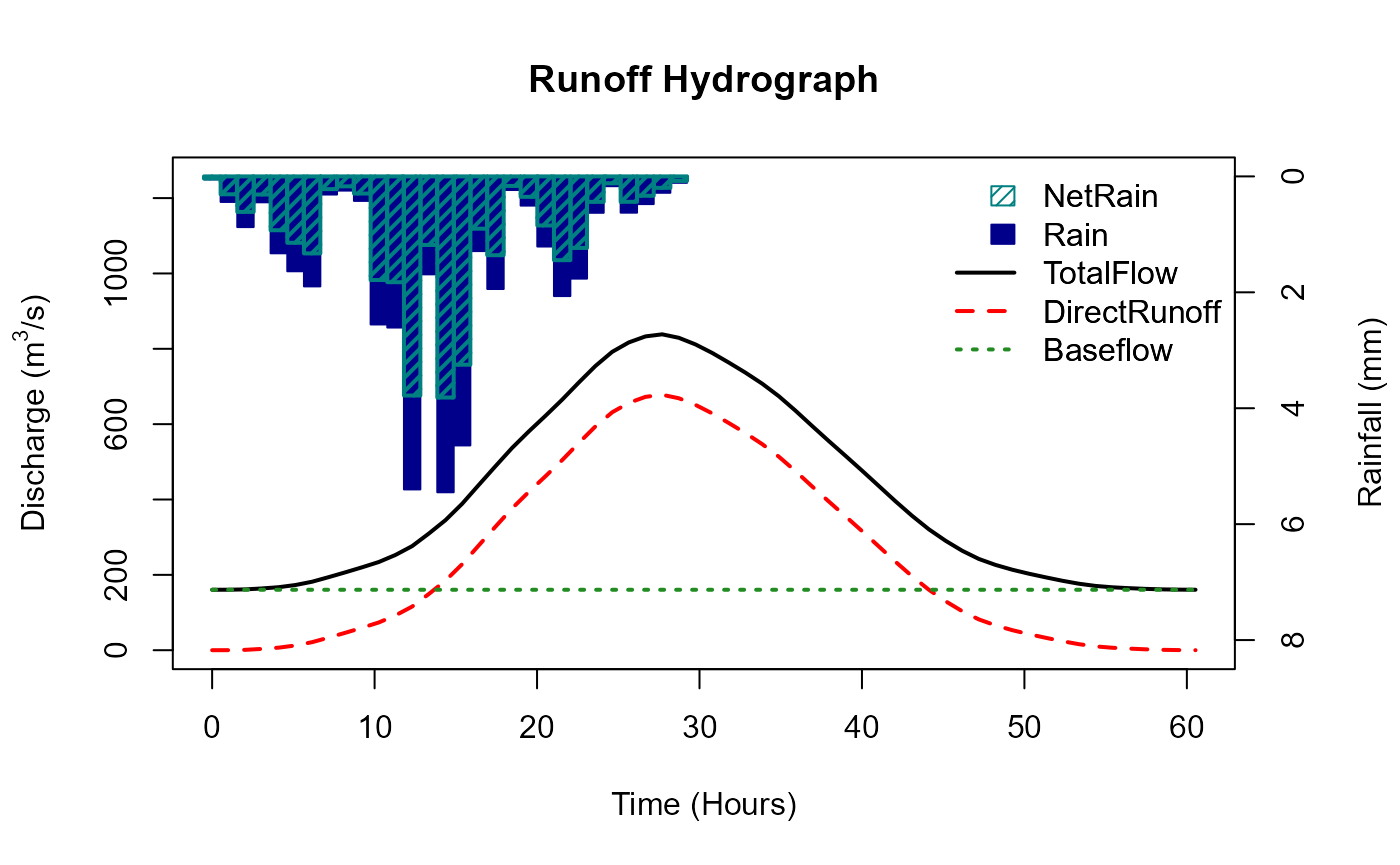
ReFH overview, assumptions and limitations
The ReFH model has three components that conceptualise the catchment process.
Model structure:
- A loss model to account for hydrological processes such as evaporation, soil moisture storage, groundwater recharge and interception losses.
- A unit hydrograph-based routing model to distribute the net rainwater over time at the catchment outlet (runoff).
- A baseflow model which determines the proportion of the runoff which becomes baseflow recharge and specifies the exponential decay of the river flow once the net rainfall has been routed through the catchment outlet.
Loss model
The loss model quantifies, for each timestep of rainfall, the proportion of the rain that is effective (the rain that forms the runoff hydrograph). It does so by assuming a maximum catchment soil moisture capacity in mm (Cmax) and an initial catchment soil moisture content in mm (Cini). The original ReFH report (Kjeldsen, 2007) suggests that the Cini / Cmax (Cini divided by Cmax) can be conceptualised as the initial proportion of the catchment that is saturated, and the initial rainfall on this saturated area will form the storm hydrograph. It is assumed that the proportion of rain becoming effective is the same as this saturated proportion.
As rainfall is added, catchment soil moisture increases and Cini / Cmax becomes Ct / Cmax, i.e. the soil moisture for the given timestep divided by the Cmax is the proportion of rain for each timestep which becomes effective.
Runoff routing model (unit hydrograph)
The unit hydrograph (UH) model is a well-established method for routing effective rainfall to the catchment outlet (Sherman, 1932). There are a number of assumptions:
- There is a direct proportional relationship between the effective rainfall and the surface runoff.
- The property of superposition. That is, if two successive amounts of
effective rainfall, then the surface runoff is the sum of the two
associated unit hydrographs (the second one being ahead by one
timestep).
- The UH does not change over time.
- The UH shape is the same for all catchments. Only the time to peak and the associated base of the UH changes between catchments.
- The catchment rainfall is spatially homogeneous.
- The rainfall in a given timestep has a constant intensity.
Baseflow model
The baseflow model assumes that the saturated area of the catchment that produces surface runoff is the same area that also produces the baseflow recharge. The assumption is that the ratio of recharge to runoff is fixed (the BR parameter). A further parameter, baseflow lag (BL), ensures that the resulting baseflow hydrograph is lagged behind that of the runoff hydrograph (effectively providing a slow flow component). However, this baseflow model does not consider the volume of rainfall directly in the same way the unit hydrograph component does. The resulting baseflow hydrograph is in addition to the runoff hydrograph volume and is calculated as a proportion of it. This means that the volume of the total hydrograph minus initial baseflow is greater than the net/effective rainfall. For the most part, this is not a significant problem because it is assumed that some of the remaining volume of the rainfall makes up the difference. However, if the proportion of effective rainfall is closer to one, the volume of the hydrograph can be greater than the gross/total input of rainfall. This will almost certainly not happen unless the event duration is considerably longer than recommended and only in catchments with a high initial proportion of saturation (due to low BFIHOST and high PROPWET). However, this ReFH function has a WaterBalance argument and setting it to TRUE means that the water balance cannot be invalidated because BR is capped such that BR = (1/NetProp)-1, NetProp is the proportion of effective rainfall.
Use cases for the ReFH() function
There are three primary use cases:
- A flexible tool to model the catchment response to event rainfall.
- A tool for estimating the T-year flow as a function of the T-year rainfall.
- To develop a plausible hydrograph shape for scaling to peak flow estimates (usually for the purposes of developing a model boundary).